

HubSpot AI CRM: 5 breakthrough features that will redefine your sales team’s productivity
Daniel Zvi

For many small business owners, "AI" sounds like an expensive buzzword reserved for Silicon Valley giants or enterprise-level corporations with seven-figure IT budgets. But in 2026, the landscape has shifted. AI is no longer a luxury—it’s a utility, much like high-speed internet or cloud storage.
HubSpot has responded to this shift by integrating its AI engine, Breeze, directly into the tools you already use every day. So you can summarize complex deals in seconds, enrich contact data without a single Google search, and deploy autonomous agents to handle your prospecting.
If your sales team is currently drowning in manual data entry or struggling to personalize outreach at scale, these five features are designed to give them back their most valuable asset: time.
What Is the HubSpot AI CRM? Understanding the Breeze Ecosystem
At the heart of the modern HubSpot experience is Breeze, the AI engine that powers the entire customer platform. Unlike "bolted-on" AI tools that sit separately from your data, Breeze is natively embedded into the Marketing, Sales, and Service Hubs. This ensures that the AI has a deep, contextual understanding of your specific customer data, leading to more accurate outputs and fewer "hallucinations."
The Three Pillars: Copilot, Agents, and Intelligence
HubSpot categorizes its AI features into three distinct but interconnected areas:
- Breeze Copilot: A conversational assistant that lives within the CRM. It can summarize long deal threads, draft emails, and pull specific data points from your records using natural language.
- Breeze Agents: Specialized, autonomous digital "teammates." Each agent is built for a specific role—such as content creation, prospecting, or customer support—and can execute multi-step workflows without constant human prompting.
- Breeze Intelligence: The data-cleansing and enrichment layer. It automatically fills in missing company information (revenue, industry, headcount) and tracks "Buyer Intent" to show you which prospects are currently researching your solution.
For a closer look at how this fits into the broader market, you can read our HubSpot CRM Review 2026 or compare it with other Best CRM Software options.
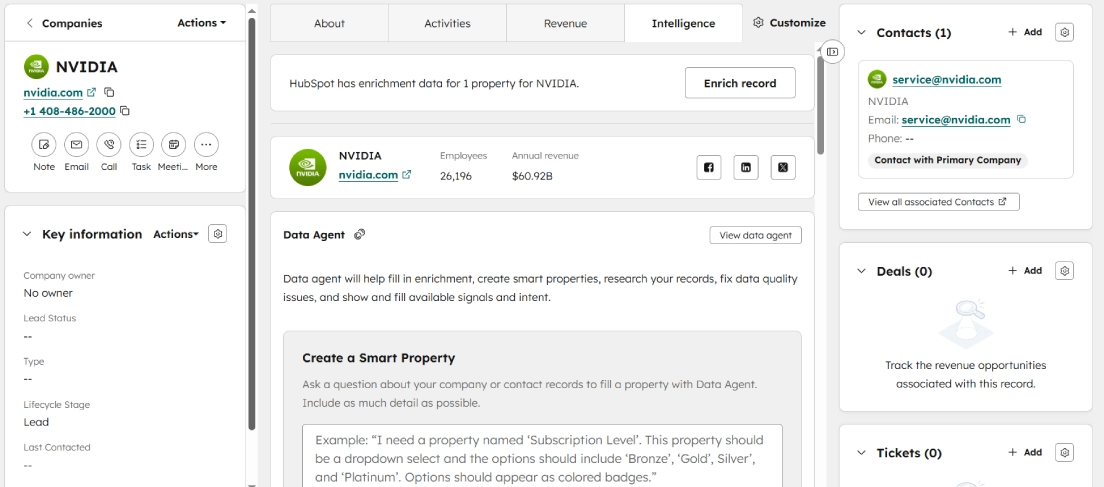
1. AI-powered lead enrichment (Breeze Intelligence)
Small teams often waste hours "googling" prospects to find a LinkedIn profile, verify a job title, or confirm a company’s annual revenue. This manual research is a productivity killer that keeps your reps from doing what they do best—talking to people.
HubSpot’s Data Enrichment (part of Breeze Intelligence) automates this detective work. When a lead enters your CRM—even if they only provide a work email address—Breeze cross-references that information against a database of over 200 million company and contact profiles to fill in the missing pieces.
- How it helps: Your reps stop playing private investigator. They can walk into every discovery call with a full picture of the prospect's industry, recent company growth, and tech stack.
- Availability: Starter plans include a monthly HubSpot Credit limit for enrichment (typically 500 credits). This allows you to test the accuracy before committing to a higher volume.
2. The AI content assistant
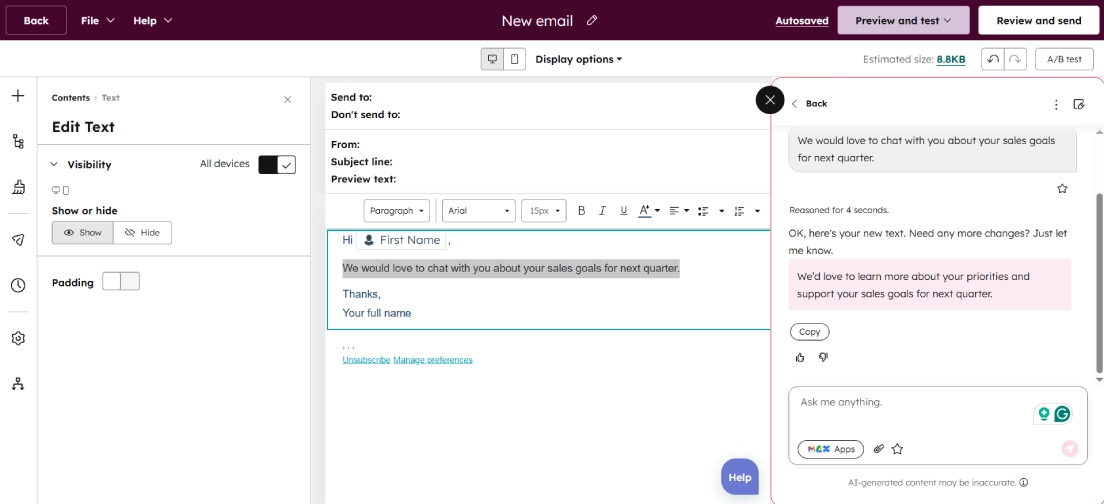
Writer’s block is a silent drain on sales velocity. Whether it’s drafting a cold outreach email or a complex follow-up after a demo, the "blank page" often leads to procrastination. The AI Content Assistant lives directly inside your email composer, landing page builder, and document editor.
This isn't just about generating text from scratch; it’s about refinement. You can highlight a paragraph that feels too wordy and ask the AI to "shorten" it, or take a bulleted list of notes and ask it to "convert to a professional email".
- How it helps: It slashes the time spent on "routine" writing. Your team can maintain a high volume of outreach without sacrificing the quality of the prose.
- The Personalization Factor: One of the biggest mistakes in sales is "copy-paste" outreach. You can prompt the assistant to "rewrite this email to be more empathetic toward a construction business owner," ensuring your message resonates with specific buyer personas.
3. Smart CRM search & Copilot
As your business grows, your CRM becomes a massive archive. Finding a specific note from a meeting six months ago or checking a client's past objections shouldn't feel like searching for a needle in a haystack. Breeze Copilot acts as a conversational layer over your data.
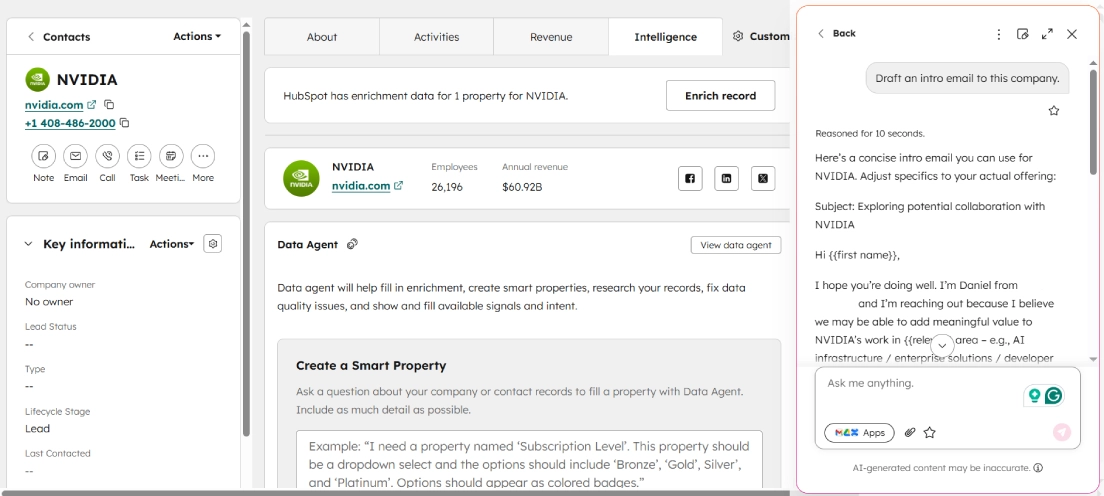
Instead of clicking through multiple tabs, you can chat with the CRM. As shown in the screenshot below, you can even ask Copilot to "Draft an intro email to this company," and it will pull context from the record (like the company name and industry) to write a relevant draft instantly.
- How it helps: It acts as a digital chief of staff. It surfaces context instantly, ensuring your reps are always prepared and don’t repeat questions the prospect has already answered.
- Availability: Basic search and summarization are generally available on Free and Starter tiers, giving small teams enterprise-grade capabilities.
4. AI-driven call & meeting summaries
Active listening is a crucial skill in sales, but it’s hard to listen when you’re frantically typing notes. While Enterprise users can enjoy automatic call transcription, Breeze Copilot brings summarization power to everyone.
Instead of spending Friday afternoon organizing your messy scribbles, you can simply feed your raw notes into Breeze and ask for a cleanup.
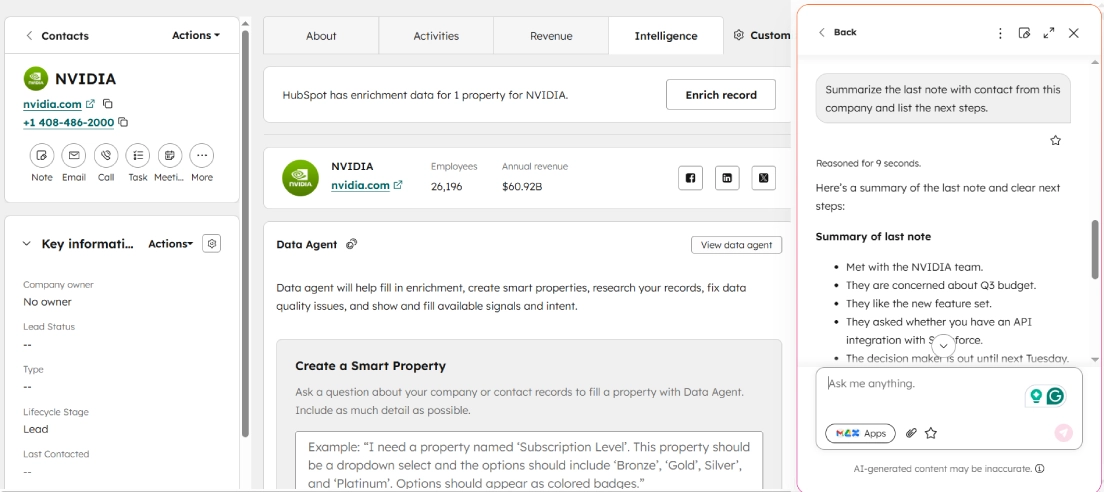
- The Workflow: After a call, jot down your raw thoughts into a CRM Note. Then, open Copilot and ask: "Summarize the last note."
- The Result: As seen below, the AI instantly formats your unstructured text into a bulleted list of "Summary" and "Next Steps" (like sending the case study or confirming budget).
- The Impact: This ensures total continuity. If a rep goes on vacation, anyone else can jump into the record, read the AI summary, and know exactly where the deal stands.
5. Predictive forecasting (The Enterprise "Glow Up")
While the features above empower individual reps, Predictive Forecasting is built for the business owner or sales manager. Small businesses often struggle with "lumpy" revenue because they rely on reps' gut feelings about when a deal will close.
HubSpot’s Enterprise-level AI analyzes historical win rates, deal velocity, and engagement levels to provide a data-backed forecast of where your revenue will actually land.
- The Enterprise Difference: While Starter plans offer excellent manual reporting, the Enterprise tier uses machine learning to weigh deal probability. It might notice that a deal hasn't had an email exchange in 10 days and automatically downgrade its "likelihood to close," giving you a more honest look at your pipeline.
Feature comparison: Free/Starter vs. Professional/Enterprise
| Feature | Free / Starter Tier | Professional / Enterprise Tier |
| Content Assistant | Standard email & blog generation | Advanced brand voice & multi-language tools |
| Breeze Intelligence | 500 monthly credits included | 3,000 - 5,000+ credits & intent data |
| Meeting Summaries | Basic transcription & summary | Sentiment analysis & talk-time tracking |
| AI Agents | Not Available (Copilot only) | Prospecting, Social Media, & Customer Agents |
| Forecasting | Manual pipeline reporting | AI-powered predictive revenue forecasting |
Common AI pitfalls for SMBs to avoid
While these tools are powerful, they aren't "set it and forget it" solutions. To get the most out of HubSpot AI, keep these three rules in mind:
- The 80/20 rule: Let the AI write the first 80% of an email, but ensure a human adds the final 20%. Purely AI-generated content can often feel "uncanny" or robotic to a savvy prospect.
- Clean data in, clean data out: AI is only as good as the data it has. Ensure your team is still logging basic deal stages so the AI has a foundation to work from.
- Monitor your credits: On Starter plans, enrichment credits are a finite resource (500/month). Use them on your "High Intent" leads rather than every single newsletter sign-up.
Moving from manual to "Breeze"
Transitioning to an AI-powered CRM doesn't have to be a "big bang" implementation that disrupts your whole office. Start small: turn on the Content Assistant for your lead sales rep and enable Meeting Summaries for your discovery calls.
By removing the administrative "grunt work" of sales, you aren't just making your team more productive; you're making them more human. They can finally focus on building the genuine relationships that drive long-term growth for your business.
Frequently Asked Questions
Q. Is HubSpot Breeze AI actually free?
A. Yes and no. Basic features like Breeze Copilot (content rewriting, summarization) are generally free and included in all plans. However, advanced features like Data Enrichment and Autonomous Agents run on a "credit" system. Starter plans include a small monthly allowance (e.g., 500 credits), but heavy usage requires purchasing additional credit packs.
Q. Does HubSpot train its AI on my customer data?
A. HubSpot states that they do not use your specific customer data to train their public AI models. When you use generative features (like writing an email), data is processed by providers like OpenAI, but HubSpot has "zero-day retention" agreements in place, meaning your data is processed and then immediately forgotten—it isn't fed back into the public ChatGPT model.
Q. Why shouldn't I just use ChatGPT for free?
A. Context. ChatGPT doesn't know who your customers are. If you ask ChatGPT to "write a follow-up email," you have to paste in all the details manually. Because Breeze lives inside your CRM, it already knows the prospect's name, company, last meeting date, and objections, allowing it to write a personalized email in one click without you ever leaving the tab.
Q. What happens if I run out of credits?
A. If you are on a Starter plan and hit your monthly enrichment limit, the feature will pause until the next month. You can choose to upgrade to a higher tier or purchase a "credit add-on" if you need high-volume data enrichment for a specific campaign.
Liked this article?
Daniel Zvi
Smart Recommendations




Thank you!